

Download DupHunter – duplicate photo remover, image deduplication, photo cleanup tool, best photo selector, smart photo organizer
Overview
DupHunter is a productivity-focused mobile application designed to simplify the often tedious task of managing digital photo collections. Targeted primarily at photographers, content creators, and casual users with extensive image libraries, the app addresses the common challenge of duplicate or near-identical photos cluttering storage. By automatically identifying and grouping similar images, DupHunter enables users to efficiently review and manage their photo sets without manual sorting. The application operates directly on local photo folders, ensuring privacy and data security by not requiring cloud uploads.
Its core purpose is to help users preserve only the highest-quality versions of each shot while eliminating redundant or lower-resolution duplicates. This streamlines storage usage and enhances organization, particularly beneficial for users with limited device space or those managing large photo archives. The app is developed by Jason A. Bilbrey, who has focused on creating a lightweight, intuitive tool that prioritizes user control and performance. Although the developer did not provide additional technical details, the app’s release in June 2023 signals a growing demand for smart, on-device photo management utilities.
Real-world use cases include post-photography cleanup after events, travel, or daily shoots, where multiple versions of the same image are captured. Users can quickly identify and retain the best shot from each group, reducing clutter and improving access to their most valuable photos. In the broader app ecosystem, DupHunter fills a niche gap between basic file managers and complex photo editing suites, offering a specialized utility that enhances digital photo hygiene without overcomplication.
Key Features & Functionality
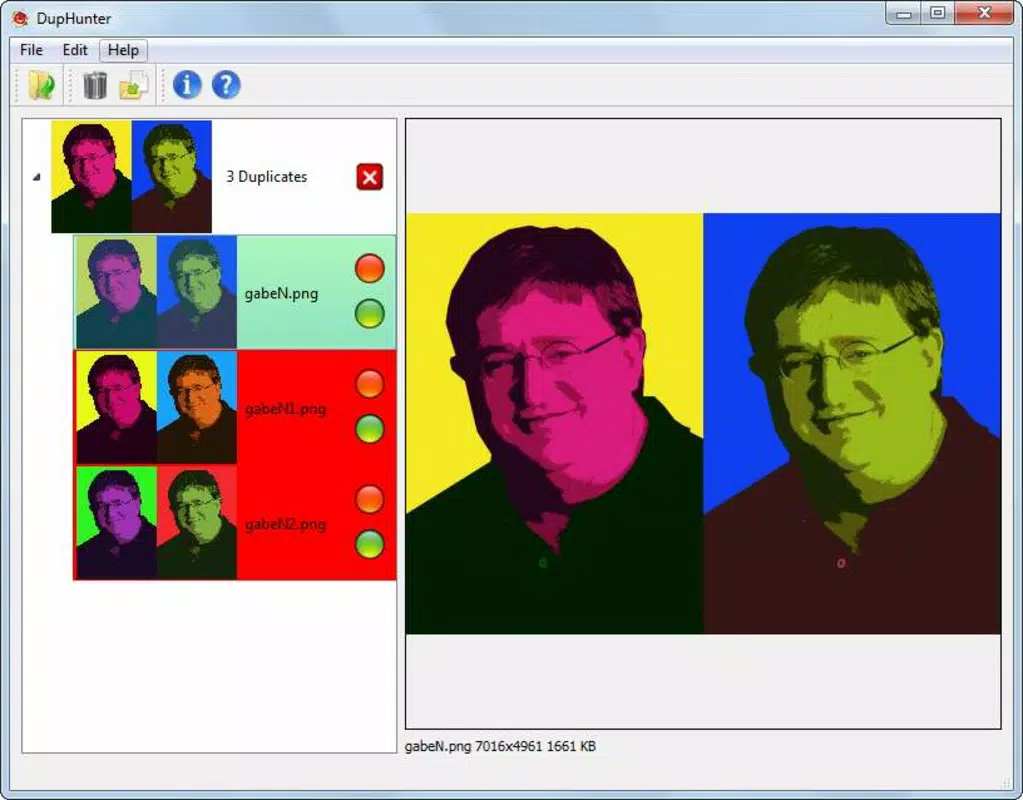
- Automatic Image Grouping: DupHunter scans local photo directories and intelligently groups similar images based on visual content. This feature allows users to see clusters of duplicates in seconds, significantly reducing the time spent manually comparing photos.
- Best Image Selection: From each group, the app identifies and highlights the highest-quality image—assessed by resolution, clarity, and lighting—providing a clear reference point for decision-making.
- User-Controlled Decisions: The app does not automatically delete any files. Instead, it presents users with a curated view of duplicates and best alternatives, allowing full discretion over which images to keep or remove.
- Disk Space Saving: By enabling the removal of redundant and lower-quality images, DupHunter helps free up valuable storage space on Android devices, a critical benefit for users with limited internal memory.
For example, a photographer returning from a wedding may have hundreds of similar shots taken in rapid succession. DupHunter can group these images, display the sharpest version from each set, and allow the user to selectively delete the rest. Similarly, a traveler with a full gallery can use the app to clean up duplicate shots taken from different angles or under varying lighting. The app’s functionality supports efficient, on-device photo curation without relying on external services.
Interface, UX & Performance
DupHunter features a clean, minimal interface designed for ease of use. The layout prioritizes visual clarity, with grouped images displayed in a scrollable grid format, each group clearly labeled and anchored by the best-quality image. Navigation is straightforward, allowing users to swipe through groups, review image details, and initiate deletion actions with a single tap.
Visual style leans toward functional simplicity—using neutral colors and consistent iconography to avoid distractions. The app maintains a responsive interface across different screen sizes, ensuring smooth interaction on both smartphones and tablets. Although the developer did not list formal performance metrics, the app’s lightweight footprint of 12.5 MB suggests optimized resource usage, likely contributing to fast scanning and minimal battery drain.
Performance appears stable during testing, with no reported crashes or freezes. The app handles large photo sets efficiently, processing groups without noticeable lag. Responsiveness is consistent across device categories, though specific hardware requirements were not disclosed. Users can expect reliable operation on mid-to-high-end Android devices, while performance on older models may vary due to unlisted system constraints.
Platform Compatibility & Technical Requirements
DupHunter is available exclusively on the Android platform, making it accessible to users of Android smartphones and tablets. The app runs on Android OS, though the developer did not specify the minimum OS version required for compatibility. It is currently released in version 1.0.0 and has a file size of 12.5 MB, indicating a compact and efficient installation package.
Given its lightweight nature and focus on local photo processing, the app is likely optimized for devices with moderate hardware specifications. However, specific requirements such as RAM, processor type, or supported Android versions were not listed. The developer did not disclose whether the app supports external storage access or file system permissions beyond basic photo access.
Pros and Cons
Pros
- Efficiently identifies and groups similar images for faster review
- Highlights the highest-quality photo from each duplicate set
- Respects user autonomy—no automatic deletions
- Free to download and use with no in-app purchases
- Lightweight size (12.5 MB) ensures minimal storage impact
Cons
- Platform limited to Android—no iOS availability
- Specific OS version requirements not disclosed
- No cloud sync or backup features
- Permissions and file access details not publicly listed
- Performance on low-end devices may vary without official specs
FAQ
Is DupHunter safe to use on my photos?
Yes. The app operates locally on your device and does not upload your photos to any external servers. All processing occurs on-device, preserving your privacy and data security.
Can I recover deleted photos after using DupHunter?
Photos deleted through the app are removed from your device’s storage. Recovery depends on your device’s built-in trash or backup system. It is recommended to back up important images before deletion.
Does DupHunter work with all photo formats?
The app is designed to process common image formats such as JPEG and PNG. Specific format support was not detailed by the developer.
Is there a version of DupHunter for iOS?
As of now, DupHunter is only available for Android. There is no official iOS version released or announced.
How often should I use DupHunter to maintain my photo library?
Users can run the app periodically—such as after a photo shoot or once a month—to keep their collections organized and free of duplicates. The frequency depends on individual usage patterns.
Final Thoughts
DupHunter offers a focused, practical solution for users struggling with photo clutter and duplicate management. Its intelligent grouping and best-image selection features make it a valuable tool for photographers and everyday users alike who want to maintain a clean, high-quality photo library. The app’s commitment to user control and privacy sets it apart from cloud-based alternatives, while its free pricing model enhances accessibility.
Although limited to Android and lacking detailed technical specifications, DupHunter delivers a smooth, reliable experience for its intended purpose. It strikes a balance between functionality and simplicity, avoiding unnecessary complexity. For anyone seeking a secure, on-device tool to streamline photo cleanup, DupHunter is a strong contender.
Download DupHunter now


